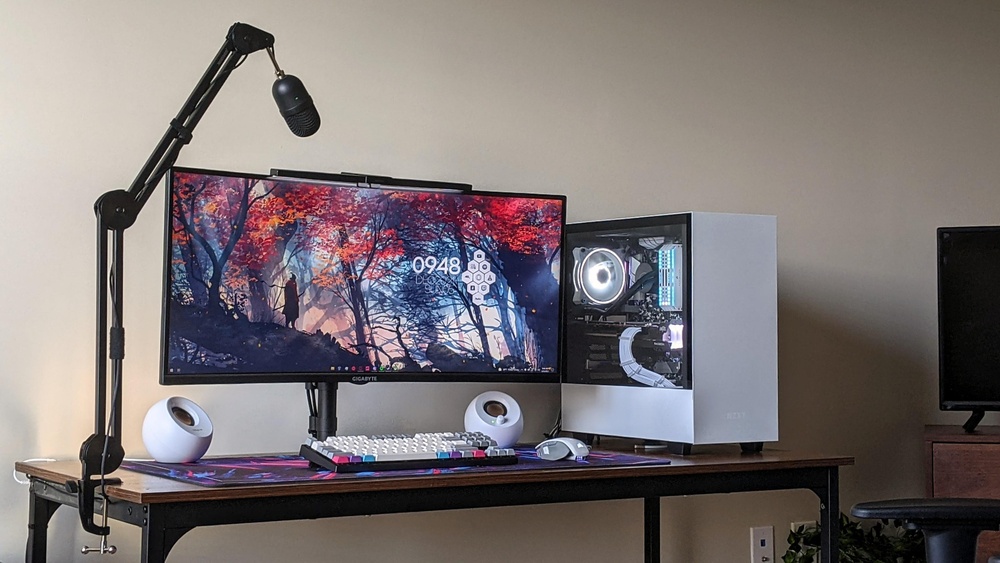
Best Place to Put Microphone Arm
Using a microphone arm helps you talk clearly and keeps your desk neat. But where should you put your microphone arm? Choosing the right place is important. It makes your voice sound better and keeps your workspace comfortable.

Credit: www.youtube.com
What Is a Microphone Arm?
A microphone arm is a tool that holds your microphone. It can move and change position. This lets you speak without holding the mic. The arm saves space and helps you get the best sound.
Why Does Placement Matter?
Where you put your microphone arm changes how you sound. If it is too far, your voice will be soft. If it is too close, your voice may sound bad or loud. Also, the arm should not block your screen or make your desk messy.
Top Places to Put Your Microphone Arm
Let’s look at the best spots to place your microphone arm. Each place has good points. You can pick what fits your desk and style.
1. Side Of Your Desk
One popular spot is the side of your desk. Use a clamp to fix the arm here. It keeps the mic near your mouth but out of your way.
- Easy to move the mic closer or away.
- Does not block your computer screen.
- Keeps the desk surface clean.
This position works well for most people. It is simple and effective.
2. Front Edge Of The Desk
You can also put the arm on the front edge. This is right in front of you. It helps get clear sound because the mic is close to your mouth.
- Good for clear and loud voice.
- Easy to adjust the mic’s height and angle.
- May take some desk space.
Be careful. If you lean forward, you might bump the mic. So, place it where it does not hit your hands.
3. Behind Your Monitor
Some people put the microphone arm behind their monitor. It is less common but can work well.
- Keeps the mic out of your view.
- Reduces desk clutter.
- Needs a long arm to reach your mouth.
This place is good if you want a clean desk look. But make sure the mic is still close enough to your mouth.
4. On A Separate Stand
If your desk is small, use a separate stand for the mic arm. Place it beside your desk or on a shelf.
- Does not use desk space.
- Easy to move and adjust.
- Needs extra space nearby.
This option is good if your desk is crowded or if you want to avoid holes or clamps.
How to Position Your Microphone on the Arm
Where you put the arm is one thing. How you place the microphone on the arm is also important. Here are some tips:
- Keep the microphone about 6 to 12 inches from your mouth.
- Place the mic slightly to the side, not directly in front of your mouth.
- Angle the mic to avoid breathing sounds and pops.
- Make sure the mic does not block your view of the screen.
These tips help you get clear sound without noise.
Important Things to Remember
When placing your microphone arm, keep these in mind:
| Tip | Why It Matters |
|---|---|
| Avoid desk vibrations | Clamping on a shaky desk can cause noise. |
| Use a good clamp | Keeps the arm steady and safe. |
| Keep cables tidy | Prevents tangles and accidents. |
| Test different spots | Find the best sound and comfort. |
| Keep mic at mouth level | Improves sound quality and comfort. |
Common Mistakes to Avoid
Placing a microphone arm seems easy. But some errors can cause problems. Watch out for these:
- Putting the mic too far away. Your voice will sound weak.
- Placing the mic too close. Your voice may sound harsh or pop.
- Blocking your computer screen with the arm or mic.
- Using a weak clamp that moves too much.
- Ignoring cable management. Tangled cables cause trouble.
Fix these problems early for the best experience.
How to Test Your Microphone Placement
After you put the microphone arm, test your setup. You want clear sound and comfort. Here is how:
- Speak in your normal voice.
- Listen to the recording or sound feedback.
- Check if your voice sounds loud and clear.
- Make sure there is no unwanted noise.
- Move the arm to fix any problems.
Repeat this until you are happy with the sound.

Credit: www.reddit.com
Frequently Asked Questions
Where Is The Best Height For A Microphone Arm?
The best height is near your mouth level to capture clear sound without strain.
Can I Attach A Microphone Arm To Any Desk?
Most desks work if they have a sturdy edge for clamp mounting.
How Far Should A Microphone Arm Extend From The Desk?
Extend it close enough to your mouth, usually 12 to 18 inches away.
Should The Microphone Arm Block My Computer Screen?
Position it to the side or below to keep your screen fully visible.
Conclusion
Finding the best place for your microphone arm makes a big difference. Side of the desk is a good start. Front edge works well for some. Behind the monitor or on a separate stand can keep things tidy.
Remember to keep the mic close, but not too close. Avoid blocking your screen. Use a strong clamp and keep cables neat.
Test your setup and adjust until you get clear sound. This simple step helps you speak better and work comfortably.
Now you know where to put your microphone arm. Try these ideas and find what fits you best!